
Version 1.6.0.0 - Smarter Activity Management, Better Visibility, Greater Control
- Apr 23
- 4 min read
Overview
Version 1.6.0.0 represents a significant step forward in both performance and day‑to‑day usability across the One platform (formerly SoCRM).
This release focuses on:
Improving reliability and performance when working with large data sets
Introducing a redesigned My Activities experience
Enhancing export processes to produce cleaner, more usable data
Refining core project, activity, and allocation workflows
Resolving a wide range of reported bugs and edge cases
The result is a faster, more stable platform that provides users with better visibility of priorities, deadlines, and responsibilities.
Key Enhancements
🚀 Performance & Data Handling Improvements
Significant optimisation has been applied across all main list views, including:
Accounts
Contacts
Sales Leads
Sales Opportunities
Projects
Cases
These screens now reliably handle in excess of 5,000 records, with improved filtering and reduced memory usage. This was achieved by refining query logic and limiting the data held in memory using optimised column selection techniques.
Export functionality has also been improved across the platform to ensure faster, more dependable downloads.
📊 Redesigned Activity Management Experience
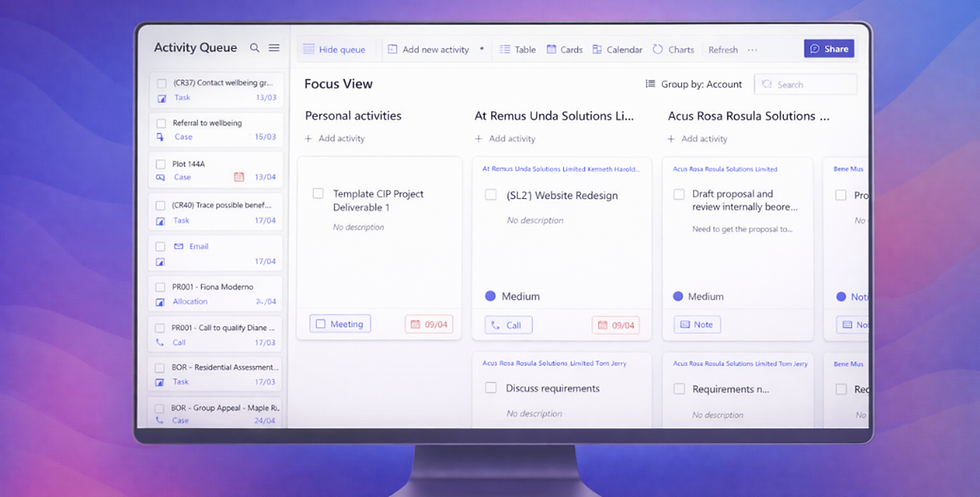
The previous My Activities view has been rebuilt into a more powerful activity management dashboard, bringing together:
Activities
Project Allocations
Cases
into a single, unified experience.
New views include:
Bucket View – a Kanban style layout allowing users to organise activities into configurable buckets
Calendar View – displaying tasks by due date with support for moving activities between dates
Focus View – enabling users to identify and prioritise tasks they intend to complete today
This redesign provides users with a clearer, more complete picture of upcoming commitments, reducing the risk of missed or late actions.
📤 Improved Export Processes
Exports across the platform have been refined to produce cleaner, more meaningful CSV files:
Unnecessary system and managed SharePoint columns have been removed
Exports now focus on essential business data
Timesheet exports now include client and project names, allowing finance teams to reconcile hours against budgets more easily
These changes significantly improve the usability of exported data.
📁 Project & Allocation Enhancements
A number of improvements have been made to project‑related workflows:
Support added for Default Associate and Default Allocation Rate when creating or editing projects
Projects can now be filtered where a user is either Project Manager or Project Director
Allocation duplication now correctly carries forward the Purpose, alongside existing copied fields
Milestone reports now use the Milestone title as the generated file name
🔗 Improved Visibility & Navigation
Account reference is now visible across the Lead, Opportunity , Project and Case screens, making it easier to locate related files in Teams or SharePoint
A new Cases tab has been added to the Account and Contact view to display associated cases
Deliverable approval emails now include:
A direct link to the related project
Additional contextual information such as client and project name
💬 Microsoft Teams Integration Improvements
Users can now post messages directly to Microsoft Teams:
Select from chats or channels they are already a member of
Post messages without leaving the One platform
This enables quicker collaboration and reduces context switching.
🐞 Resolved Issues & Bug Fixes
Version 1.6.0.0 includes a comprehensive set of bug fixes aimed at improving reliability, consistency, and user confidence across the platform. All items below have been addressed in this release.
Activity & Dashboard Fixes
Completing activities did not update status correctly.
Activities marked as Complete from the new My Activities screen now reliably update the underlying activity status, ensuring accurate reporting and task tracking.
Multiple repetitive actions could lock the app (CR1158)
Improved handling of repeated operations prevents the app becoming unresponsive during high‑frequency user actions.
Project activity status filters applying incorrect values
Activity filters within Projects now correctly apply selected status criteria.
Project & Allocation Fixes
Project template allocations incorrectly named after deliverable updates (CR1191)
Allocations are no longer included in project templates, removing inconsistent naming behaviour and preventing failures where original users are no longer available.
Adding project allocations via Timesheets saved to the wrong week (CR1758)
Allocations created from Timesheets now save correctly against the intended week.
Allocations under deliverables not fully visible (CR1759)
Scrolling and layout issues that prevented users from seeing all allocations have been resolved.
Users could incorrectly self‑approve milestones and deliverables
Approval logic has been updated to prevent users approving their own milestones or deliverables.
Opportunity & Sales Fixes
New Opportunities inherited activity data from existing records (CR1779)
Newly created Opportunities no longer pull through historic or unrelated activity data.
Leads could be incorrectly qualified with missing required values (CR1775)
Validation logic has been tightened to prevent progression where mandatory fields (such as Account ID) are missing.
Mobile & UI Fixes
Mobile app horizontal scrolling issues (CR1245)
Mobile optimisation applied across the whole platform to ensure your data moves with you.
Import, Export & Data Handling Fixes
Data import process was unreliable and error‑prone
The import experience has been stabilised, and problematic entry points have been refined or removed to prevent inconsistent behaviour caused by Excel connector limitations.
Exports included excessive system and managed SharePoint columns
Export workflows now return cleaner CSV files containing only relevant business data.
Work report exports missing key context for Finance teams
Client name and Project name are now included, enabling accurate budget reconciliation.
Integration Fixes
Approver lists incorrectly populated for Deliverables (CR1699)
Approval pickers now resolve correctly, preventing blank or malformed approver lists.
General Stability Improvements
Improved scrolling, layout, and rendering consistency across multiple screens
Reduced likelihood of incomplete save operations due to race conditions
Improved resilience when handling large volumes of records across core screens


Comments